The Technology.
Kinect
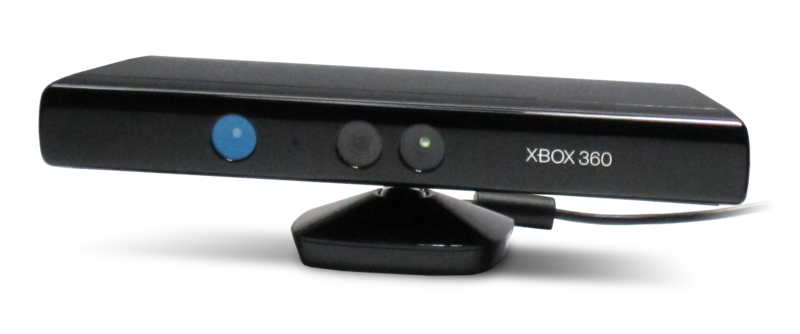
Kinect for Xbox 360 atau biasanya Kinect(Dulunya di ketahui oleh Project Natal),adalah "controller-free gaming dan pengalaman hiburan" olehMicrosoft dan Xbox 360 video game platform,dan mungkin digunakan untuk Windows 8.Kinect akan bersaing dengan Wii Remote dengan Wii MotionPlus dan PlayStation Move dengan PlayStation Eye gerak sistem kontrol untuk Wii dan PlayStation 3 konsol rumah masing-masing.
Kinect di luncurkan di Amerika Utara pada tanggal 4 November 2010,di Eropa pada tanggal 10 November 2010,di Australia,New Zealand dan Singapura pada tanggal 18 November 2010 dan di Jepang pada tanggal 22 November 2010.Pembelian opsi untuk sensor perifer termasuk bundel dengan permainan Kinect Adventures dan konsol bundel dengan baik 4 GB atau 250 GB konsol Xbox 360 dan Kinect Adventures.
Dalam tanggal 29 November 2010 Kinect telah terjual sebanyak 2,5 juta.
Teknologi
Kinect didasarkan dari teknologi perangkat lunak yang dikembangkan secara internal oleh Rare, anak perusahaan dari Microsoft Game Studios milik Microsoft, dan teknologi kamera oleh pengembang Israel, PrimeSense. PrimeSense mengembangkan sistem yang dapat mengintepretasikan gestur secara spesifik, sehingga kontrol secara hands-free dapat dilakukan pada perangkat elektronik menggunakan proyektor infrared dan kamera, serta microchip khusus untuk melacak pergerakan objek dan individu pada bidang tiga dimensi. Sistem 3D scanner tersebut dinamakan Light Coding yang menggunakan variasi dari rekonstruksi gambar 3D
Sensor Kinect adalah batang horizontal yang terhubung dengan alas kecil yang memiliki poros yang dapat berputar. Sensor Kinect dirancang untuk diletakkan diatas maupun di bawah TV. Perangkat ini memiliki kamera RGB, sensor kedalaman dan mikrofon yang berjalan di perangkat software khusus, yang menyediakan kemampuan untuk menangkap gerak secara 3D, mengenali wajah dan mengenali suara. Saat diluncurkan, fitur pengenal suara hanya tersedia di Jepang, Amerika Serika Kanada, dan Inggris. Sekarang fitur ini tersedia di Australia, kanada, Prancis, Jerman, Irlandia, Jepang Meksiko, New Zealand Amerika Serikat dan Inggris. Sistem multi-mikrofon pada Sensor Kinect memungkinkan Xbox 360 untuk mengurangi suara bising, sehingga kegiatan seperti ngobrol secara hands-free dapat dilakukan lewat Xbox Live.
Sensor kedalaman terdiri dari proyektor laser infrared dikombinasikan dengan sensor CMOS monokromatik, yang merekam data video 3D dalam kondisi pencahayaan apapun. Area pengenalan sensor kedalaman dapat diatur, dan perangkat lunak Kinect secara otomatis mampu mengkalibrasikan sensor berdasarkan permainan dan kondisi lingkungan pemain, mengenali keberadaan furnitur maupun halangan lain. Kinect secara simultan mampu mengenali hingga enam orang, termasuk dua pemain aktif untuk dianalisis gerakannya pada 20 titik sendi tiap orang. Namun, PrimeSense menyatakan bahwa jumlah orang yang dapat "dilihat" (tidak diproses sebagai pemain) hanya dibatasi oleh berapa banyak yang dapat masuk ke dalam jangkauan kamera.
Reverse engineering menentukan bahwa keluaran sensor Kinect pada frame rate 30Hz. Pengiriman video RGB menggunakan 8-bit resolusi VGA (640 x 480 piksel) dengan filter warna Bayer, sedangkan pengiriman video monokrom untuk deteksi kedalaman menggunakan resolusi VGA dengan 11-bit. Sensor Kinect memiliki area penggunaan 1.2-35 m (3.9-11 kaki).
Reverse engineering has determined that the Kinect sensor outputs video at a frame rate of 30 Hz. The RGB video stream uses 8-bit VGA resolution (640 × 480 pixels) with a Bayer color filter, while the monochrome depth sensing video stream is in VGA resolution (640 × 480 pixels) with 11-bit depth, which provides 2,048 levels of sensitivity. The Kinect sensor has a practical ranging limit of 1.2–3.5 m (3.9–11 ft) distance when used with the Xbox software. The area required to play Kinect is roughly 6 m2, although the sensor can maintain tracking through an extended range of approximately 0.7–6 m (2.3–20 ft). The sensor has an angular field of view of 57° horizontally and 43° vertically, while the motorized pivot is capable of tilting the sensor up to 27° either up or down. The horizontal field of the Kinect sensor at the minimum viewing distance of ~0.8 m (2.6 ft) is therefore ~87 cm (34 in), and the vertical field is ~63 cm (25 in), resulting in a resolution of just over 1.3 mm (0.051 in) per pixel. The microphone array features four microphone capsules and operates with each channel processing 16-bit audio at a sampling rate of 16 kHz.
PlayStation Move
PlayStation Move is a motion-sensing game controller platform for the PlayStation 3 (PS3) video game console by Sony Computer Entertainment(SCE). Based around a handheld motion controller wand, PlayStation Move uses the PlayStation Eye camera to track the wand's position, and inertial sensors in the wand to detect its motion. First revealed on 2 June 2009, PlayStation Move launched in mainland Europe and most Asian markets on 15 September 2010, in Australasia on 16 September 2010, in North America and the UK on 17 September 2010, in Japan on 21 October 2010. Hardware available at launch included the main PlayStation Move motion controller, a supplementary PlayStation Move navigation controller, and an optional PlayStation Move charging station. It competes with the Wii Remote Plus and Kinect motion controllers for the Wii and Xbox 360home consoles, respectively.
Although PlayStation Move is implemented on the existing PlayStation 3 console, Sony stated that it treated Move's debut as its own major "platform launch", with an aggressive marketing campaign to support it. The tagline for PlayStation Move from E3 2010 was "This Changes Everything",including partnerships with Coca-Cola, as part of the "It Only Does Everything" marketing campaign which debuted with the redesigned "Slim" PlayStation 3.
Hardware
As with the standard PlayStation wireless controllers (Sixaxis, DualShock 3), both the main PlayStation Move motion controller and the PlayStation Move navigation controller use Bluetooth 2.0 wireless radio communication, and an internal lithium-ion battery which is charged via a USB Mini-B port on the controller. Up to four Move controllers can be used at once (four Move motion controllers, or two Move motion controllers and two Move navigation controllers).
Motion controller
The primary component of PlayStation Move, the PlayStation Move motion controller (CECH-ZCM1E) is a wand controller which allows the user to interact with the PlayStation 3 through motion and position in front of the PlayStation Eye camera.
Technology
The PlayStation Move features a variety of internal sensors to gauge orientation.
The PlayStation Move motion controller features an orb at the head which can glow in any of a full range of colors using RGB light-emitting diodes (LEDs). Based on the colors in the user environment captured by the PlayStation Eye camera, the system dynamically selects an orb color that can be distinguished from the rest of the scene. The colored light serves as an active marker, the position of which can be tracked along the image plane by the PlayStation Eye. The uniform spherical shape and known size of the light also allows the system to simply determine the controller's distance from the PlayStation Eye through the light's image size, thus enabling the controller's position to be tracked in three dimensions with high precision and accuracy. The sphere-based distance calculation allows the controller to operate with minimal processing latency, as opposed to other camera-based control techniques on the PlayStation 3.
A pair of inertial sensors inside the controller, a three-axis linear accelerometer and a three-axis angular rate sensor, are used to track rotation as well as overall motion. An internal magnetometer is also used for calibrating the controller's orientation against the Earth's magnetic field to help correct against cumulative error (drift) by the inertial sensors. The inertial sensors can be used for dead reckoning in cases which the camera tracking is insufficient, such as when the controller is obscured behind the player's back.
The controller face features a large ovoid primary button (Move), small action buttons and a regular-sized PS button, arranged in a similar configuration as on the Blu-ray Disc Remote Control. On the left and right side of the controller is a Select and Start button, respectively. On the underside is an analog trigger (T). On the tail end of the controller is the wrist strap, USB port, and extension port.
The motion controller features vibration-based haptic technology. In addition to providing a tracking reference, the controller's orb light can be used to provide visual feedback, simulating aesthetic effects such as the muzzle flash of a gun, or the paint on a brush.
Using different orb colors for each controller, up to four motion controllers can be tracked at once with the PlayStation Eye. Demonstrations for the controller have featured activities using a single motion controller, as well as those in which the user wields two motion controllers, with one in each hand. To minimize the cost of entry, Sony has stated that all launch titles for PlayStation Move will be playable with one motion controller, with enhanced options available for multiple motion controllers.
All image processing for PlayStation Move is performed in the PlayStation 3's Cell microprocessor. According to Sony, use of the motion-tracking library entails some Synergistic Processing Unit (SPU) overhead as well an impact on memory, though the company states that the effects will be minimized.According to Move motion controller co-designer Anton Mikhailov, the library uses 1-2 megabytes of system memory.
Navigation controller
PlayStation Move navigation controller
The PlayStation Move navigation controller (originally referred to as the PlayStation Move sub-controller and also known as the navi-controller) is a one-handed supplementary controller designed for use in conjunction with the PlayStation Move motion controller for certain types of gameplay. Replicating the major functionality of the left side of a standard PlayStation Wireless Controller, the PlayStation Move navigation controller features a left analog stick (with L3 button function), a D-pad, and L1 and L2 analog triggers.The navigation controller also features and action buttons, as well as a PS button. Since all controls correspond to those of a standard Wireless Controller, a Sixaxis or DualShock 3 controller can be used in place of the navigation controller in PlayStation Move applications.
Accessories
Announced at E3 2010, the PlayStation Move charging station is a charging base unit designed to charge two PlayStation Move controllers (any combination of motion controllers or navigation controllers).
The PlayStation Move shooting attachment is an accessory for the PlayStation Move motion controller that adapts the motion controller into a handgun form. The motion controller is fitted into the gun barrel so that the motion controller's T trigger is interlocked with the trigger on the gun attachment, while leaving all the topmost buttons accessible through a hole in the top, similar to the Wii Zapper.
The PlayStation Move Sharp Shooter Attachment is an accessory for the PlayStation Move motion controller that adapts both the motion controller and navigation controller into a submachine gun form, which features an adjustable shoulder support. The motion controller is fitted into the gun barrel so that the motion controller's T trigger is interlocked with the trigger, and the navigation controller is clipped into a holder below this gun barrel. However, the accessory goes far deeper by adding several extra buttons and controls (via the EXT connector on the base of the Move Motion Controller). These extra buttons include and buttons (on both sides, located near the T and M buttons), RL button (located under the gun's magazine) and pump-action mechanism (located under the barrel) which both can be used to reload (or alternately may serve another function depending on future game design), 3-setting Firing Rate control, M-button lock, and secondary M button (located below the Trigger) for easy access. The peripheral is officially supported by Killzone 3, Dead Space: Extraction, SOCOM 4: U.S. Navy SEALs and Resistance 3.
At E3 2012, a new accessory was shown, called the PlayStation Move Racing Wheel. The racing wheel utilises the motion tracking capabilities of the Move controller to steer vehicles in video games and also features vibration feedback, paddle-style gear shifters and twist throttle controls. The grips are able to fold outwards to imitate motorcycle handlebars. Sony has stated that it will be available in Late 2012 at a price of US$39.99, and will support games like LittleBigPlanet Karting, Gran Turismo 5, Need for Speed: Hot Pursuit, Burnout Paradise, and MotorStorm: Apocalypse, among others. In Sony's press release, they stated that, if "paired with the precise tracking of PS Move, the Racing Wheel is a completely functional unit that offers second-to-none mechanics to control all aspects of your favorite racing games."
Bundle packages
In addition to selling the controllers individually, Sony also provides several different bundle options for PlayStation Move hardware such as: software/camera bundles with a PlayStation Eye, a Move motion controller and motion-control enabled software; console bundles which include a PS3 console, DualShock 3 controller, PlayStation Eye, and Move motion controller; and bundles with a Move motion controller with select games.
Though the games with the bundles vary in each region, most bundles come with the PlayStation Move Demo Disc which contains demos for eleven different games. The bundles in Europe and Oceania however, come with the PlayStation Move Starter Disc with a setup tutorial and nine demos (same as the Demo Disc, except without Kung Fu Rider and Time Crisis). The demos included are for the games Beat Sketcher, Echochrome II, EyePet, Kung Fu Rider, Sports Champions, Start the Party!, The Shoot, Tiger Woods PGA Tour 11, Time Crisis: Razing Storm,Tumble, and TV Superstars.
In North America, bundles are available with the game Sports Champions or the PlayStation Move edition of EyePet. In Japan, bundles with Beat Sketch!, Biohazard 5 Alternative Edition orBig 3 Gun Shooting are available.All bundles, as well as the stand alone controller will also include the demo disk for a limited time. In Europe, a bundle will be released with a demo disc. In Asian countries outside Japan such as Singapore, the bundles are available with the games Sports Champions, Start the Party! and Kung Fu Rider.
History
The PlayStation Eye is used in conjunction with the Move to track movement.
Research on the PlayStation Move began as early as 2001, stemming from parallel development of the EyeToy which was eventually released in 2003. An early prototype version of the Move was demonstrated in a technology demo known as "Magic Duel" in 2001, in which developers experimented with color-based 3D controller tracking,including prototypes using spheres. In 2008 Sony began work on developing a commercial product, integrating inertial sensors into the motion controller, and refining the device from an engineering and a design perspective.
The motion controller was revealed at Sony's E3 2009 press conference on 2 June 2009, with a live demonstration using an engineering prototype.Tentatively referred to as the PlayStation Motion Controller, the device was originally stated to be available in Q1/Q2 2010. As of August 2009, the controller features and design had not been finalized.
Soon after revealing the motion controller to developers, Sony indicated that it was exploring the possibility of using the motion controller in combination with a standard PlayStation Wireless Controller, such as having the player use "the motion controller as a sword and use DualShock 3 as a shield." A combination control scheme was demonstrated in September 2009 at the Tokyo Game Show for Biohazard 5: Alternative Edition, making particular use of the DualShock 3's analog stick. Although users found the setup to work well, some found holding a DualShock in one hand to be somewhat awkward. At the time Sony was already rumored to be in the design phase of a supplementary controller akin to that of theNunchuk controller for the Wii Remote.
In January 2010, Sony announced a revised release target, stating instead that the motion controller would launch in Q3/Q4 of 2010. On March 10, Sony revealed the official name and logo at the Game Developers Conference, showcasing the final motion controller design, and unveiling the PlayStation Move navigation controller (then referred to as the PlayStation Move sub-controller), to be launched concurrently with the motion controller. The logo is a colored squiggle-like shape, representing a light trail from the sphere of a PlayStation Move motion controller being waved. Newly revealed in the final motion controller was the inclusion of an internal magnetometer.
Name
Prior to the Game Developers Conference 2010, the PlayStation Move motion controller was known by several names. Initially given little guidance on what to call the device when it was unveiled in June 2009, many in the video game press informally referred to the controller as the "magic wand" or simply "Wand" due to the controller's wand design and glowing orb.Sony had used the term "PlayStation Motion Controller" from the motion controller's introduction, but many perceived it to be used merely as a description. Sony gradually clarified "Motion Controller" as the tentative name, but by this time media attention had shifted to rumored final names. In September 2009, statements in two unconnected interviews at the Tokyo Game Show led to speculation that the controller may be referred to by developers as the "Sphere". In December, a brief reference to the motion controller as "Gem" by Electronic Arts CEO John Riccitiello during a media industry conference presentation prompted an admission by Sony that "Gem" was an early code name for the controller.
In January 2010, video game blog VG247 reported that Sony had named its PS3 motion control platform "Arc". The name was observed to liken the controller's glowing orb to the charged sphere of a Tesla coil or a plasma globe electrode. The report was supported by evidence emerging in the following weeks, including a registration of the playstationarc.com domain name to SCE dated October 2009 (shortly after the Tokyo Game Show)and numerous references to "Arc" by president Brian Farrell of video game publisher THQ during the company's February earnings conference call. Responding to speculation that Farrell's statements effectively confirmed the name, SCEA senior director of corporate communications Patrick Seybold stated that they did not, and that Farrell was referring to "Arc" as a "rumored code name."
On March 1, it was reported that Sony submitted Japanese trademark application filing for "PlayStation Arc".A week later on March 8, Sony was reportedly considering a hasty renaming due to a trademark held by competitor Microsoft for its Arc-brand PC accessories, which could present trademark conflicts. On March 9, Sony submitted a European trademark filing for "PlayStation Move", which was announced as the official name the next day at Sony's press conference at the Game Developers Conference. Video gaming blog Joystiq reports several anonymous Sony sources claiming that the PlayStation Move logo presented at the conference resembles a letter "A" because it is the same design for when the name was "PlayStation Arc", in which the "A" would stand for "Arc".
Promotion
As part of the promotional marketing for Sorcery, the PlayStation Move controller was inducted into The Magic Circle museum by Vice President Scott Penrose.